
Teamup Ticker
How to obtain iCal (ics) feed links for others
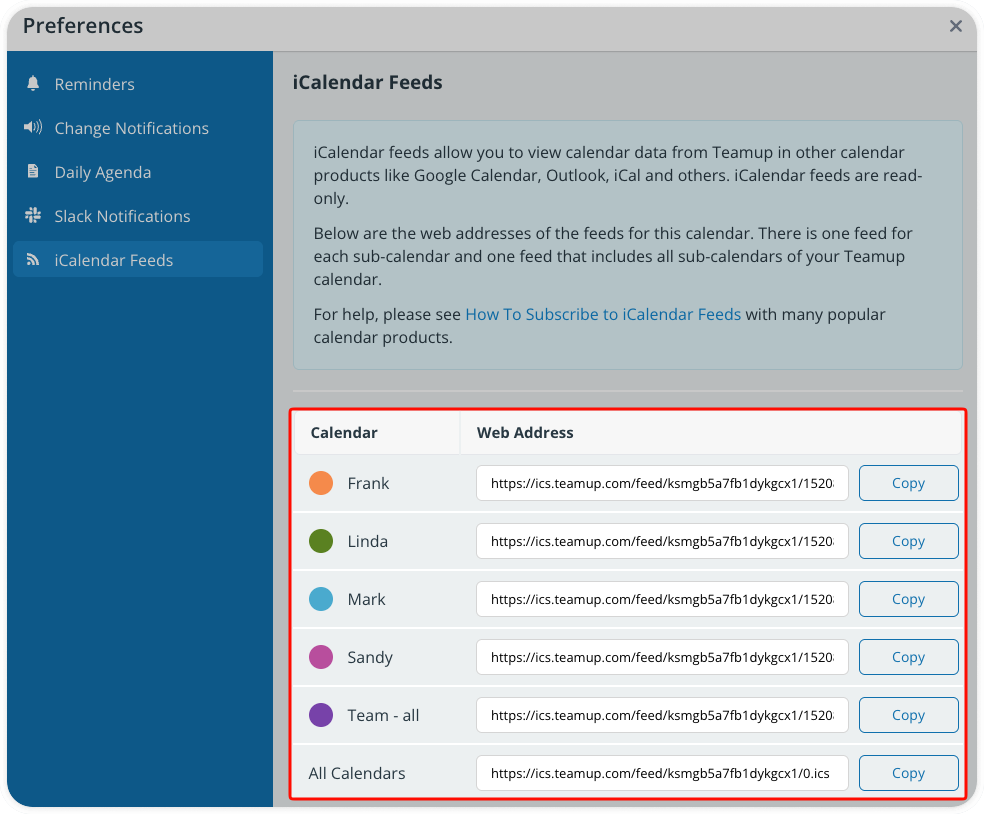
If users want to set up an iCalendar feed from Teamup, the best option is to let them obtain their own ics feed links:
- They should log into Teamup and open the calendar with their own access.
- Click the blue menu (top right), then select Preferences > iCalendar Feeds.
- They can then copy the ics feed link and paste it into their calendar to set up the iCalendar feed.
Having users obtain their own ics feed links is best for a shared calendar. This ensures that their own permissions apply to the feed events, so they are not shown information they should not have access to via the feed.
Alternately, a calendar administrator can obtain an ics feed link for someone who is not a user by using a secure calendar link:
- Create a calendar link with read-only or read-only, no details permission applied. Include only the appropriate sub-calendars for the person who will be using the iCalendar feed.
- Open the calendar with this read-only link.
- Copy the appropriate ics feed link and share it. admin person first views the calendar with read-only (or the relevant restricted access), then obtains the ics link to send out to users.
Important security note: It's important not to share ics feed links that were obtained while viewing the calendar with administrator access, or even with a higher-level of access (e.g. modify permission, or access to more sub-calendars) than is appropriate for the individual(s) who will be viewing the iCalendar feed. Allowing others to use the ics feed link from a higher level of access can create security issues.
See here for more on managing security with iCalendar feeds.