
Teamup Ticker
▶️ How to use event signups
Interactive Demo: How to use event signups
Users with modify access can enable event signups and adjust signup settings on individual events. See also how to manage signups on the Teamup app.
Access level required: Modify users
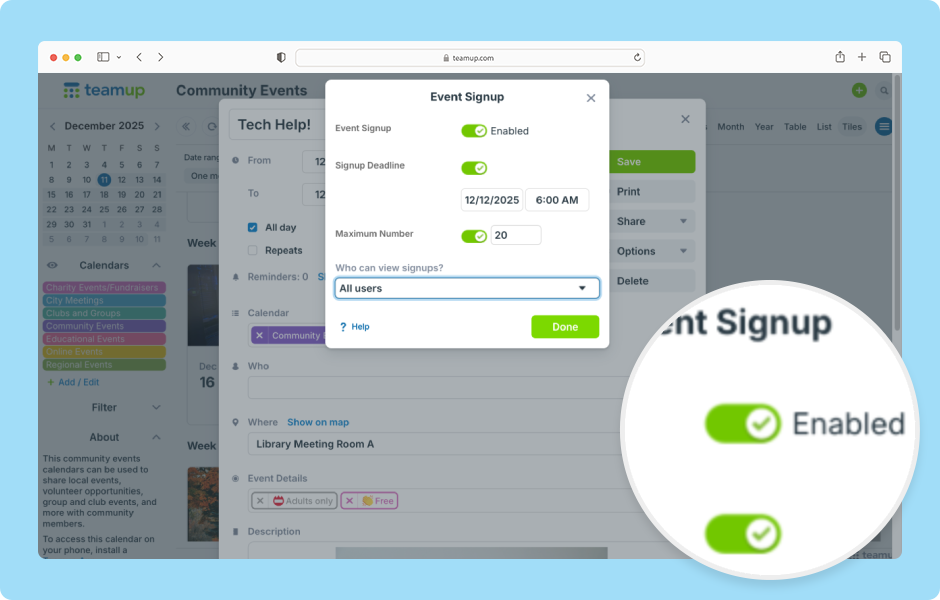
- Open Teamup in a browser.
- Click on the calendar to create a new event or open an event and click Edit.
- Click the Options button.
- Select Signup.
- If signups are disabled, click the Event Signup toggle to enable them.
-
To set a deadline for signups:
-
Toggle the Signup Deadline on.
-
Click or type in the time field to adjust the deadline time.
-
Click into the date field then click a date to adjust the signup deadline.
-
-
To set a limit on signups:
-
Toggle the Maximum Number on.
-
Use the arrows or type in the field to adjust the number of maximum signups.
-
-
Choose who can view the signup list: All users or Users with modify permission.
- Click Done.
- Save the event.
-
As participants sign up, their information will be added to the Signup list on the event.
-
Click Remove next to a participant to remove their signup.
-
Click Export to export the list of participants to a CSV file.
-
-
Users can click the Signup button to register.
-
The information in the registration form will be prefilled for Teamup users who are logged into their account.
-
-
Signups work on event pages, too.
-
If All users can see signups, participant names will be visible on event pages and for read-only users.
-
If only Modify users can see signups, the deadline and maximum number will appear below the Signup button. The Signup field and participant list will not be shown.
-
ℹ️ Learn more