
Teamup Ticker
Check the default sharing permission for new sub-calendars
Tue Mar 17, 2026
.Ticker > Tips / Support Nuggets
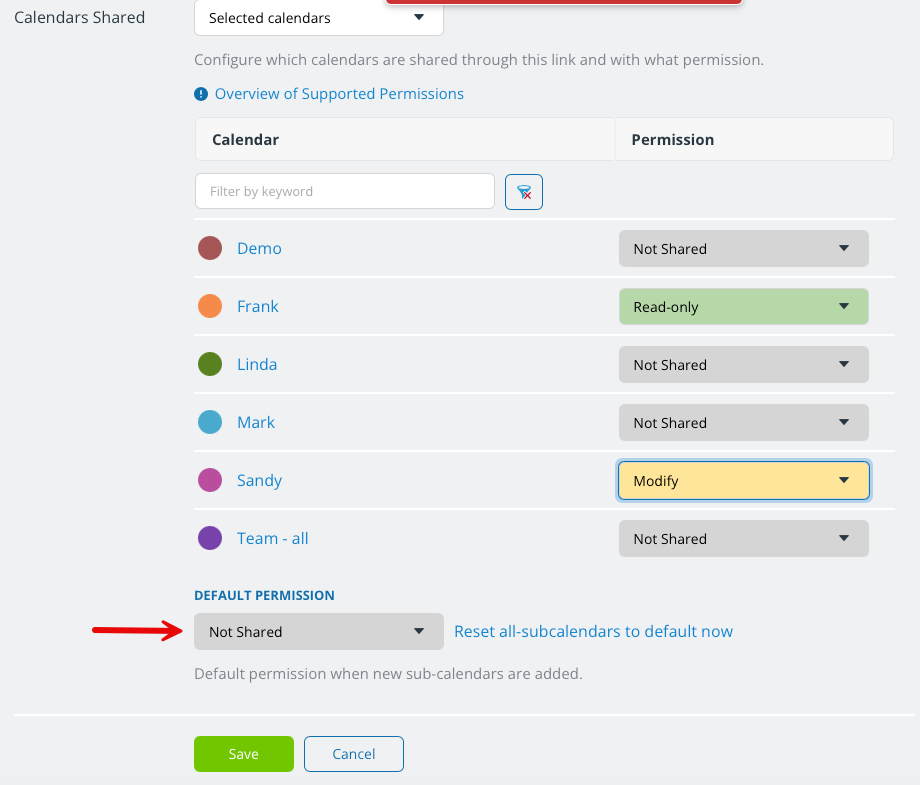
When adding a user, there is a setting in the Calendars Shared section to specify the default permission to apply for new sub-calendars that are added to the calendar.
The safest setting is to select Not shared. This ensures that users are not given access to new sub-calendars if they should not have it. You can modify user permissions as needed to grant permission to new sub-calendars, if appropriate.
If you are using a secure link to embed a calendar or share it with a group, the same recommendation applies. For best security, set the default permission to Not Shared to avoid accidentally including new sub-calendars in an embedded calendar view.
See also how to review and modify who can access each sub-calendar.
access, modify, not shared, security, data, permissions, users, links, embedded, sub-calendars