
Teamup Ticker
Make sure everyone sees events in their own time zone
Mon Jul 6, 2026
.Ticker > Tips / Support Nuggets
If you're planning an event like an online meeting or webinar that will be attended by people in multiple time zones, you want to make sure each person sees event details in their own local time zone.
With Teamup, this can be handled automatically.
Just make sure that automatic time zone detection is enabled.
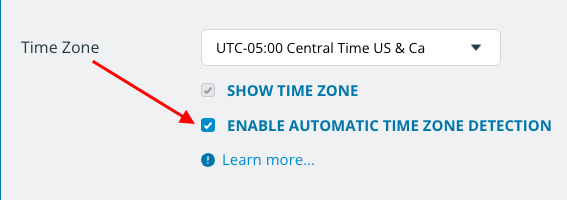
When this option is enabled:
- Teamup will automatically open in the time zone set as local (on the computer or mobile device) for the person viewing the calendar.
- Teamup will automatically convert event times relative to the displayed time zone.
The calendar administrator can enable automatic time zone detection:
- Open Teamup in a browser.
- Go to Settings > Date & Time.
- In the Time Zone section, check the box next to the option as shown above.
time zone, time and date, settings, configure, options, automatic time zone, event time conversion