
Teamup Ticker
📱Different ways to share an event from the Teamup app
Tue Jun 2, 2026
.Ticker > Tips / Support Nuggets
Teamup’s free mobile apps for iOS or Android devices give you complete access to your calendar anywhere. You can share calendar events on your iPhone or Android, send calendar invites, and share calendar events via text, email, and social media.
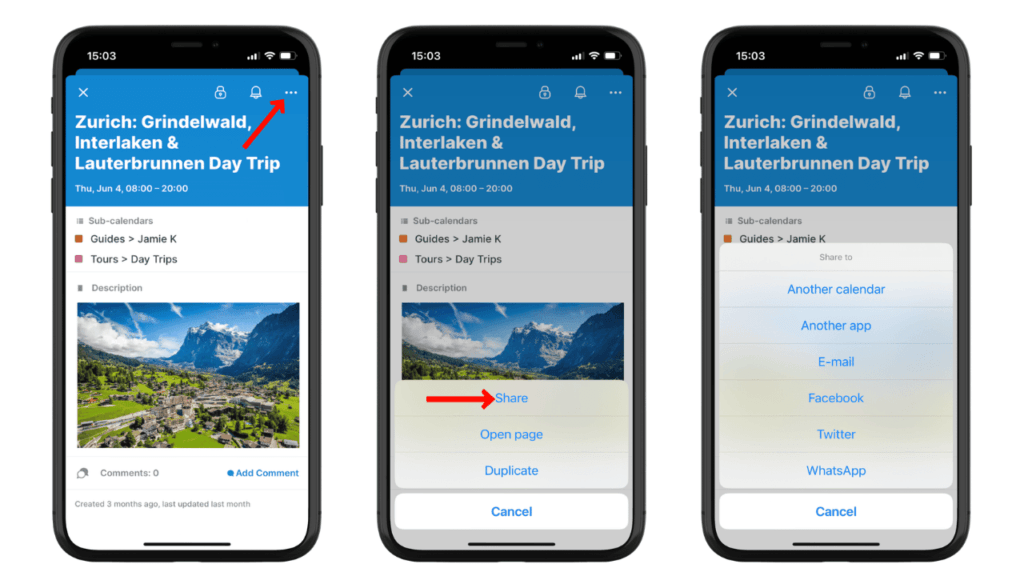
Using the Teamup app, you can share calendar events via mobile to groups or to individuals:
- send to a Whatsapp group.
- share calendar event in a group text.
- send calendar invite via text with a single person.
- share to a Facebook group.
- send the event page link in an email.
- share a calendar event on social media.
To share an event, open it, then tap the three-dot menu in the top right.
From there, tap Share to see sharing options, then choose the one you want: Email, Whatsapp, so on.
Or, tap Open page to see the event page in your mobile browser, the use the sharing options in your mobile browser to share the event page link wherever you want.
app, mobile, event, invite, share, text, group, chat, social, invitation, event page