
Teamup Ticker
Scheduler View: Clarity + visual organization
Wed Aug 26, 2026
.Ticker > Learn / Blog / Knowledge Base
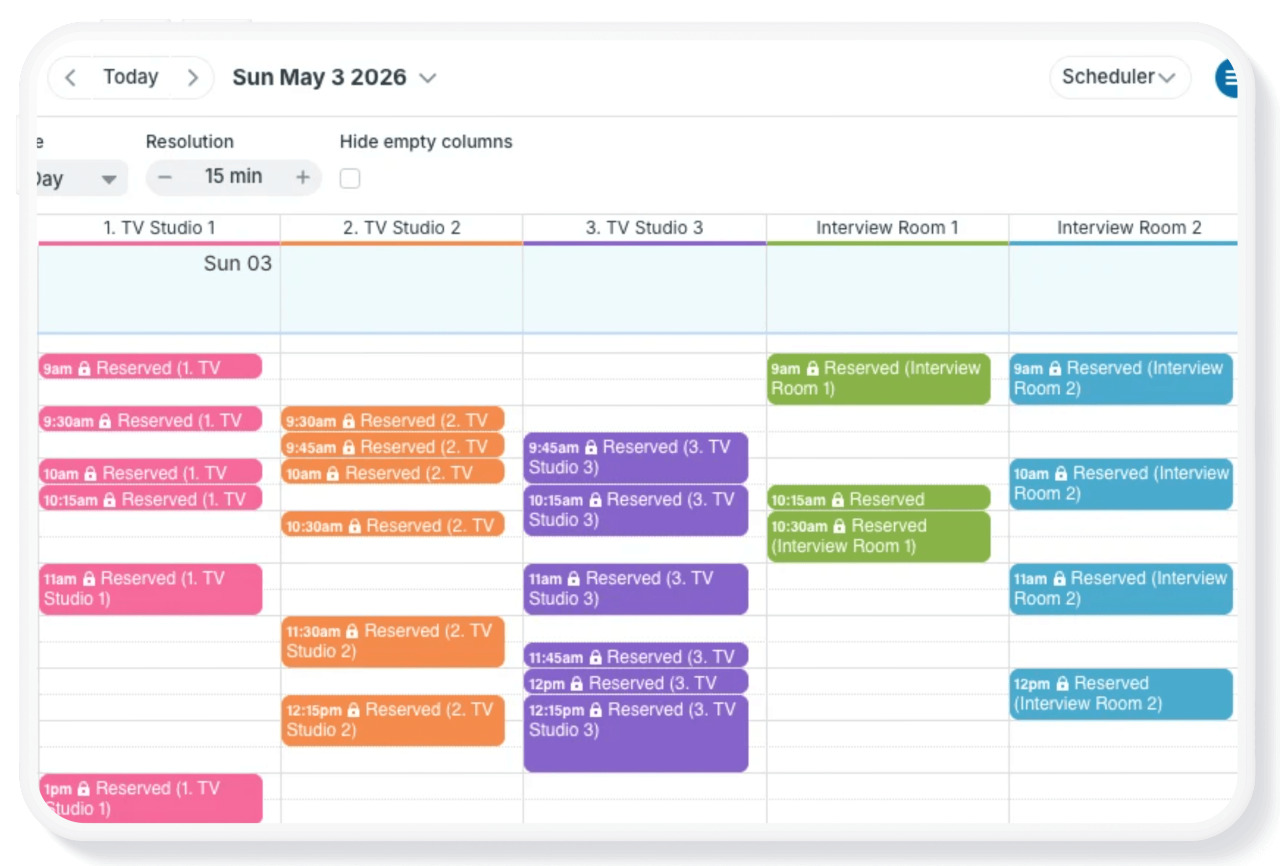
Scheduler view is one of Teamup’s most unique and powerful calendar views. It’s a very different calendar layout than traditional calendar views. Each sub-calendar is displayed in its own column, so events from each calendar are shown side-by-side. Scheduler view can make it easier and faster to compare schedules and find availability.
What makes Scheduler view special
Sub-calendars are displayed as columns to provide clear visual distinction between each calendar, even on a busy calendar.
- Events shown side-by-side: Most calendar views sort and stack events by start time. Scheduler view keeps events organized by calendar, organized in a vertical time grid.
- Adjustable date range: Focus on a single day or see up to 5 years’ of events in a scrollable view.
- Adjustable resolution: Zoom in or out to see the level of detail you need.
- Useful for short-term and long-term: Adjust the view options to get granular, viewing a single day in 5-minute increments, or scroll through an overview of weeks, months, or years.
- Toggle sub-calendars: Click title bars on the calendar panel to show or hide sub-calendars and keep only the relevant ones on the screen.
- Automatically hide empty columns: Check the box to hide empty columns and see only sub-calendars with scheduled events.
🔗 Learn more about what makes Scheduler view special or see examples of Scheduler view in action.
calendar views, layout, display, columns, board, Scheduler