
Teamup Ticker
Set up simple, secure self-booking for your group
Fri Jun 5, 2026
.Ticker > Tips / Support Nuggets
If you're managing a shared space or resource, for a group, neighborhood, or sports club, you may find yourself doing a lot of work just to keep reservations straight.
Teamup can make things simpler:
- Create a shared Teamup calendar.
- Create a sub-calendar for each shared space or resource.
- Set each sub-calendar to prevent overlapping events, so double-bookings are automatically stopped.
- Create a secure, add-only link for members.
With this setup, your group members get direct self-booking access while keeping reservations secure.
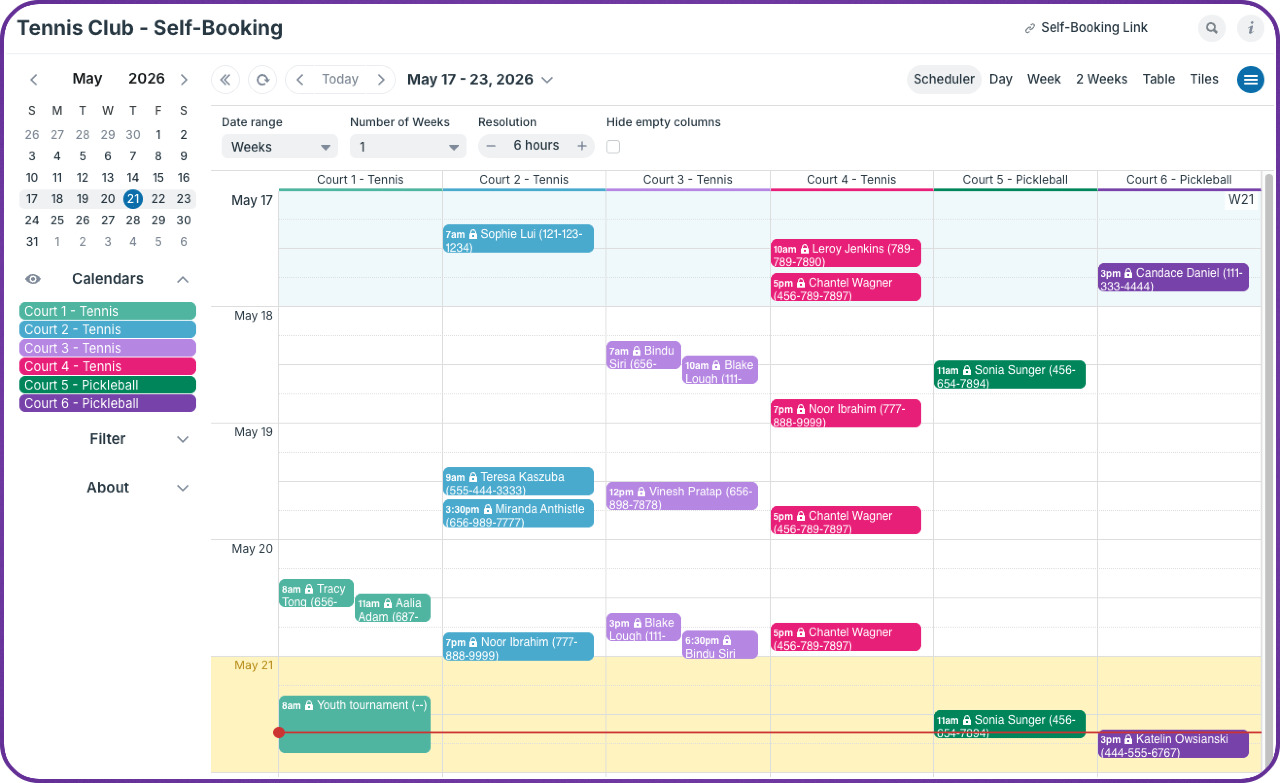
How it works:
- The add-only permission allows each person to add their own reservation to the appropriate sub-calendar. They have a short window of time to make any changes before the reservation "locks" and can't be edited.
- No one can change a reservation that's already been made and locked.
- Everyone can see the reservations that are already on the calendar, so no need to call in or email or text to find out when a certain space is free. They can just check the calendar.
- If needed, use the add-only, no details permission that will show other reservations only as "Reserved" without revealing any details.
- The club admin can have full control over all reservations and can cancel or change them if needed.
Here's how this setup works for a small tennis club. The same concept can work for groups that share resources, equipment, meeting rooms, sports fields, so on.
self-booking, reservations, club, sports, field, shared, resources, booking, members, add-only