
Teamup Ticker
Send an event invitation from the Teamup app
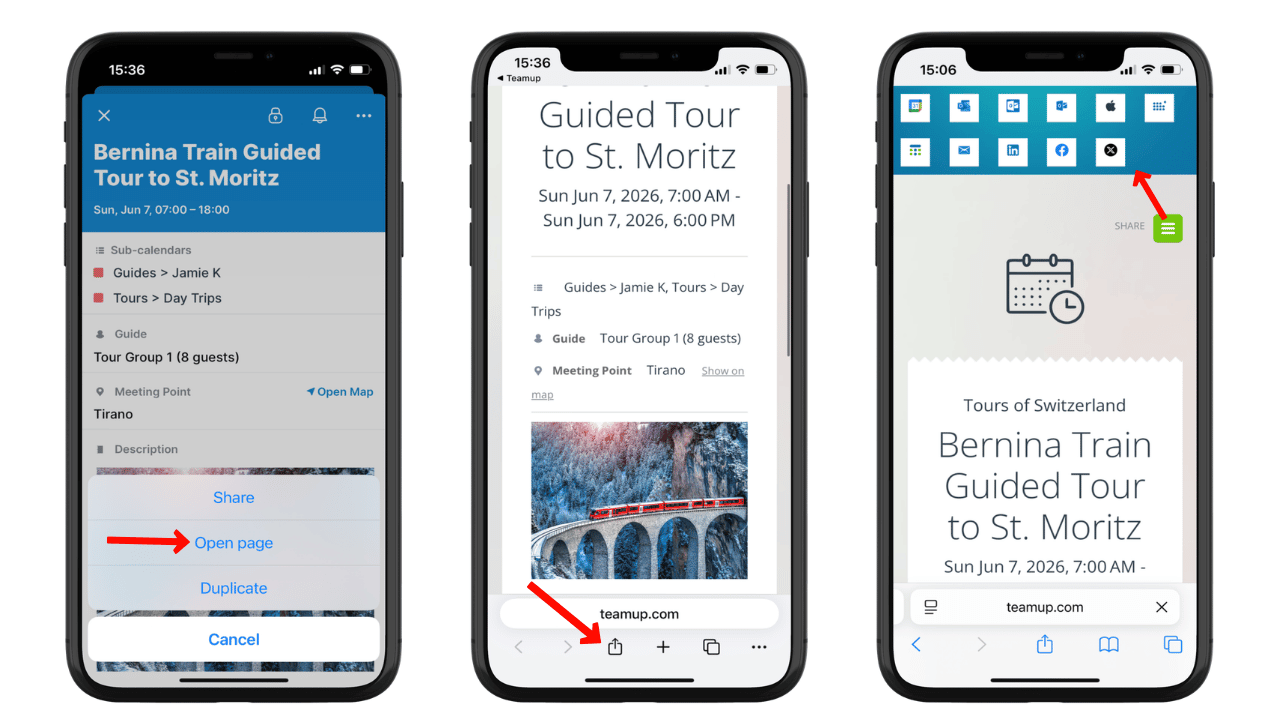
Sending Teamup calendar invites on mobile is as easy as sharing an event:
- Create or open the event.
- Tap the three dot menu, then tap Open page.
- Use your mobile browser’s sharing menu or tap the green Share button to open sharing options.
- Send the event page to the people you want to invite.
Customized, updated event pages
Any Teamup event can be turned into a stand-alone event page automatically. Then you can share the event with anyone or on other platforms. It's a customized, synced event invitation that keeps everything secure while keeping all invitees updated.
💡Add photos or images to make the event page more interesting. Don’t forget to format the text (see here for how to format text on Teamup mobile apps).
From the event page, there are several ways to send calendar invites:
- Copy the link and send it to anyone as a calendar invite.
- Use the sharing menu built into your mobile browser.
- Use the sharing options at the top of the event page.
🌐 Here’s a great thing about event pages: if you change any of the event details, the event page will automatically update. So you won’t have to resend the calendar invite.
When you copy the event page link and send it via email, text, or share it via Whatsapp or another app, you will have the option to include your own message along with the event page link. Personalize your invitation, point out an important detail, or ask people to sign up or leave a comment, then send the event information.