
Teamup Ticker
Schedule and share a meeting across time zones
Perhaps you have a situation like this: you need to schedule and share a meeting with team members who work in different time zones.
The team meeting will occur at 11 AM Eastern Time / 10 AM Central Time / 9 AM Mountain Time / 8 AM Pacific Time.
You’re in the Pacific time zone, adding the meeting to the calendar at 8am Pacific Time.
But the other team members are in different time zones. You want to make sure that the meeting shows up on each person's calendar at the appropriate time for their time zone so they know when to join the call:
- The team members in San Francisco will join the call at 8 AM local time.
- The team members in Denver will join the call at 9 AM local time.
- The team members in Chicago will join the call at 10 AM local time.
- The team members in New York will join the call at 11 AM local time.
Here's how easy it is to manage this scenario when Teamup is used as your shared team calendar:
Since you’re in the Pacific time zone, and your calendar is displaying Pacific Time (as shown in the bottom right), you can leave the time zone of your calendar set to Pacific Time and create the event for 8 AM:
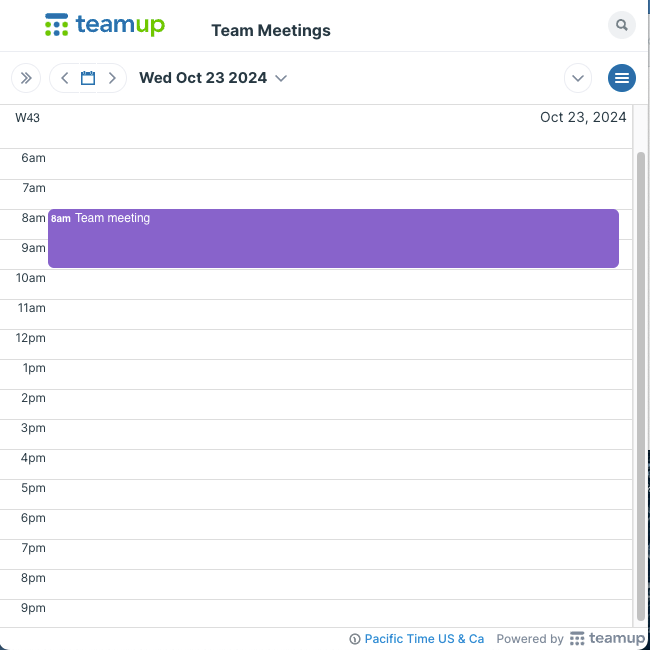
Each team member will view the calendar in their own time zone and the event time will automatically adjust as needed.
When a team member in Denver views the event, with the time zone of their calendar set to Mountain Time, the event time will show as 9am:
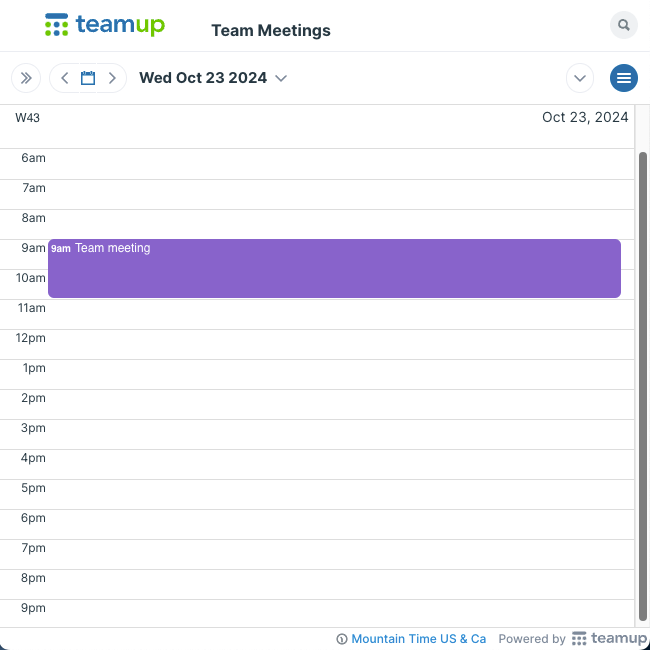
With Teamup’s automatic event time conversion, you don’t have to do time zone calculations to share an accurate event time with colleagues in different locations. Just create the event in the appropriate time zone, and when colleagues view the same event in their own time zone the event time will automatically adjust.