
Teamup Ticker
How to export your calendar data
Tue Nov 10, 2026
.Ticker > Tips / Support Nuggets
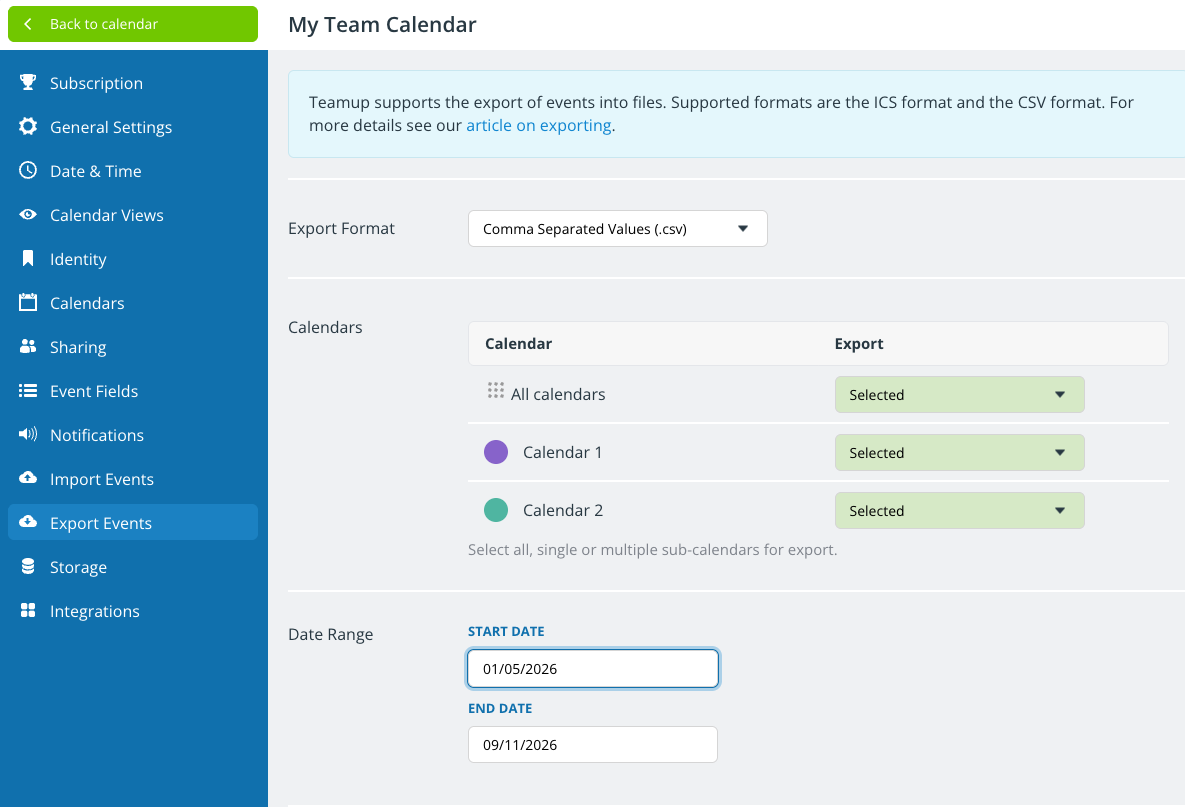
Calendar administrators can export events, signups, and comments. Here's how:
- Open your calendar in a browser and go to Settings > Export Events.
- Choose the format (.ics or .csv).
- Select calendars, set the date range, and click Export.
Use .ics to move events to another calendar app, like Google Calendar or Outlook. It’s the standard calendar format and fully supports repeating events. Each sub-calendar exports as its own file, and custom fields are added to the event description.
Use .csv to move data between Teamup calendars or to work with it in a spreadsheet. It keeps custom fields and multiple sub-calendars per event, exports the whole calendar in one file, and can include signups and comments.
The .csv format also provides more control:
- Choose how to handle events assigned to multiple sub-calendars.
- Choose whether to treat repeating events as a single series or separate event instances.