
Teamup Ticker
Set up simple, flexible employee hour tracking
Fri Sep 4, 2026
.Ticker > Learn / Blog / Knowledge Base
Employee hour tracking is a common need in many industries, especially those in field services. For many small businesses, the requirements for tracking employee hours are simple: They don’t require a dedicated app or software solution that larger organizations may need. Here’s how to use Teamup as an employee timesheet calendar with convenient, secure hour tracking, quick reporting, and built-in flexibility.
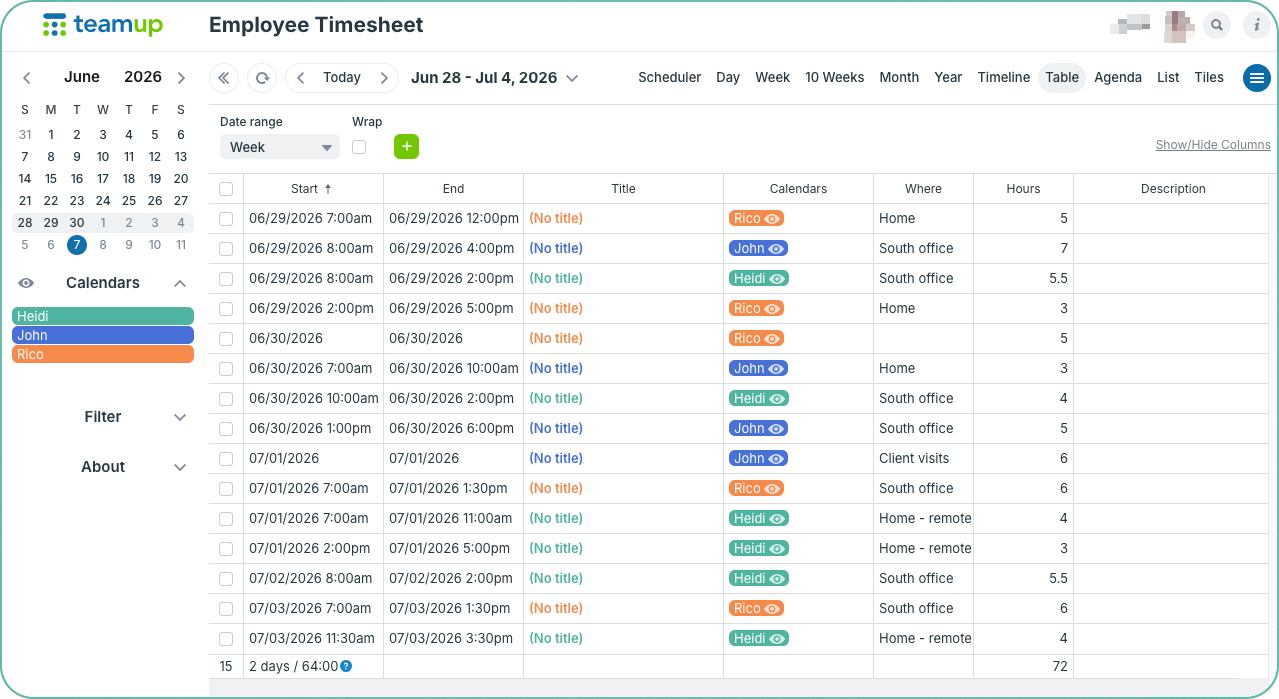
- One-time setup for ongoing tracking: No need to create a new timesheet for each week or month.
- Always accessible: Employees can enter their hours on a browser or through the Teamup app.
- Always up-to-date: No delays between entry and updates. The manager can always see the latest hours that have been entered.
- Secure, smart access control: Each employee only needs to track their own hours, so they only have access to their own schedule.
- Different views: Besides Table view shown above, it’s easy to change to Scheduler view or Timeline view or Week view for view overlaps, upcoming shifts, etc.
- Work with data: Data can printed, downloaded as a PDF file, or exported in CSV format for use in other programs.
🔗 Get started fast with a mini setup guide.
employees, staff, tracking, hours, timesheet, Table view