
Teamup Ticker
Easily capture numerical data on your calendar
Mon Feb 9, 2026
.Ticker > Tips / Support Nuggets
Teamup’s unique custom fields significantly extends the possibilities of getting organized far beyond a typical calendar app.
One custom field type is specifically made for capturing numerical data:
- Set Pre/Postfix text to display before or after the numeric value.
- Set the number of decimals to round the value to.
- The sum of the number field for the selected date range is shown in the footer row in Table view.
- Number field contents can be displayed beside the event title.
- Each custom number field is shown in its own column in Table view.
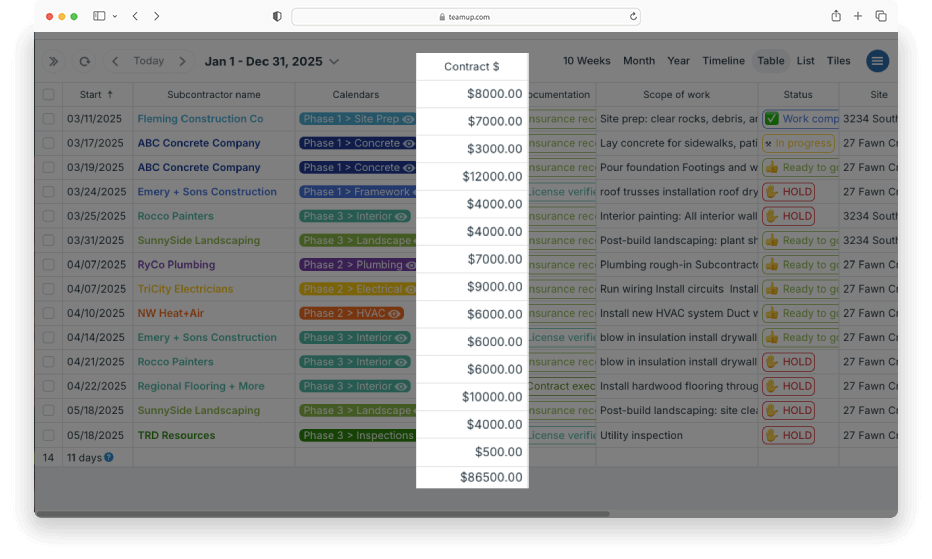
Users can input numerical data such as a dollar amount or hours estimate. Amounts in the number field can be automatically summed in Table view. It’s a great way to capture those numbers consistently across all jobs, then be able to quickly see totals for a given date range, job type, or combination.
Ideas for number fields
- Show the walking distance for tourism or community events.
- List the price of scheduled workshops.
- Track the weight for each delivery load.
- Assign a number of pages or questions.
- Track word count or exercise reps.
- Track the estimated hours for a job.
custom fields, numerical data, number field, pricing, hours, estimates, information organization