
Teamup Ticker
An overview of Teamup's permission levels
Fri 28 Nov 2025
.Ticker > Tips / Support Nuggets
When you give someone access to a calendar, you need to define the permission level you want to grant. Each sub-calendar (room) has its own permission settings — from Read-only and Add-only to Modify rights with variations of each that hide details of other people’s events. It is also possible to set permissions globally by user or group, applying one access level to all sub-calendars.
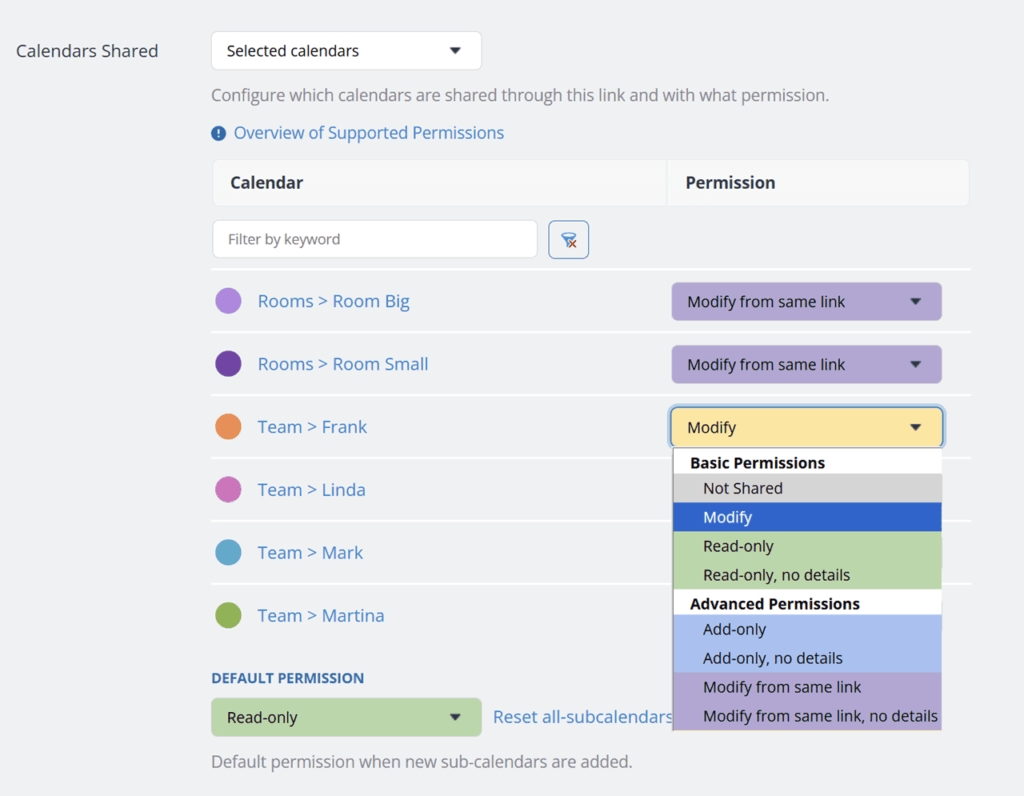
Here's an overview of Teamup's 9 Access Permission Levels
- Read only: Can view calendar events, including all details, but cannot make changes.
- Read only, no details: Can view calendar events as reserved time blocks with no event details visible and cannot make any changes.
- Add only: Can add new events and view existing ones, but cannot modify or delete them. Newly added events can be modified only during the current browser session (about 30 minutes).
- Add only, no details: Same as Add-only, but existing event details are hidden (shown as reserved).
- Modify: Can add, edit, and delete any events on the shared calendar.
- Modify my events (or Modify from same link): Can add new events and edit or delete only those they created. Can view, but not edit, events created by others.
- Modify my events, no details: Same as Modify my events, but the details of events created by others are hidden and shown only as reserved time blocks.
- Not shared: Prevents any access. The user or link cannot view the sub-calendar at all.
- Administrator: Includes all permissions and is the only level that allows access to the calendar Settings, where the calendar is configured and all access permissions can be managed.
access, permissions, levels, share, security, users, links