
Teamup Ticker
Editing an event assigned to multiple sub-calendars
Question: I have modify permission for the office calendar. But when my supervisor adds a meeting to the office sub-calendar and the multimedia team's calendar, I can't change any details for that event. What's going on?
Customized access affects editing ability
A Teamup user might have different permission levels assigned for each sub-calendar they can access. The different permission levels will affect how editing works for an event assigned to multiple calendars.
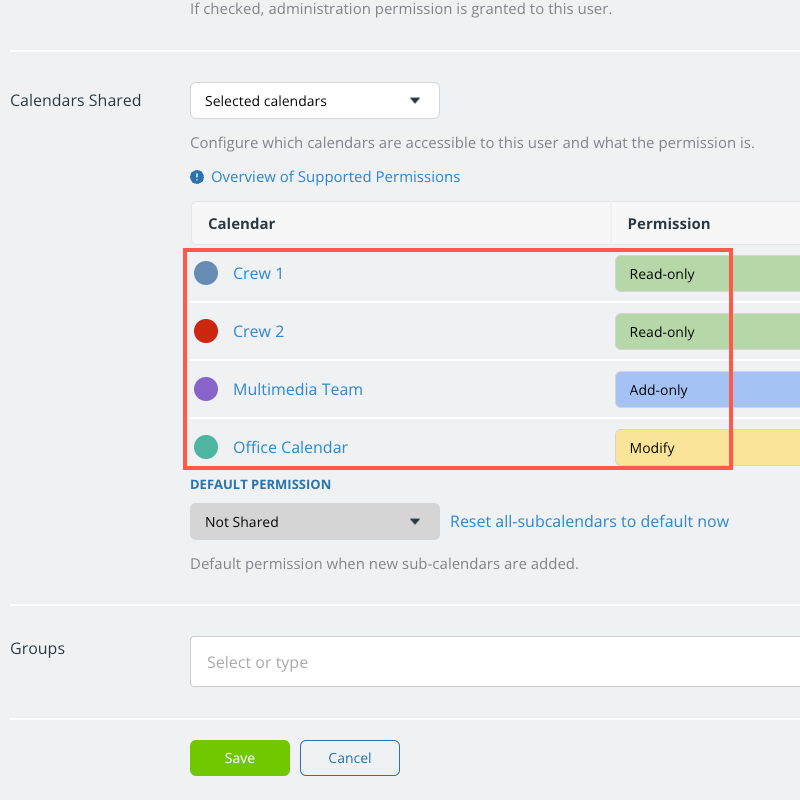
Here's an example:
- Marco has access to four sub-calendars (shown above).
- The permissions are different: He has read-only permission to the Crew calendars, add-only permission to the Multimedia Team calendar, and modify permission to the Office Calendar.
- This means Marco cannot edit events that are on the Crew calendars.
- He can only add events to the Multimedia calendar.
- He can edit events on the Office calendar.
- For events assigned to multiple calendars, Marco will have access based on his permission to the assigned sub-calendars.
Who can edit one-to-many events?
A supervisor with modify permission to all sub-calendars could create an event and assign it to all four sub-calendars that Marco can access.
The supervisor is able to create + edit this multi-calendar event because they have modify access to all the sub-calendars.
For each user, the permission level for a multi-calendar event will default to the lowest permission level that user has to any assigned sub-calendar.
A user with modify access to all assigned calendars will be able to modify the event.
A user with read-only access to one (or more) of the assigned calendars will only be able to read the event, not modify it.
Read-only permission = read-only event
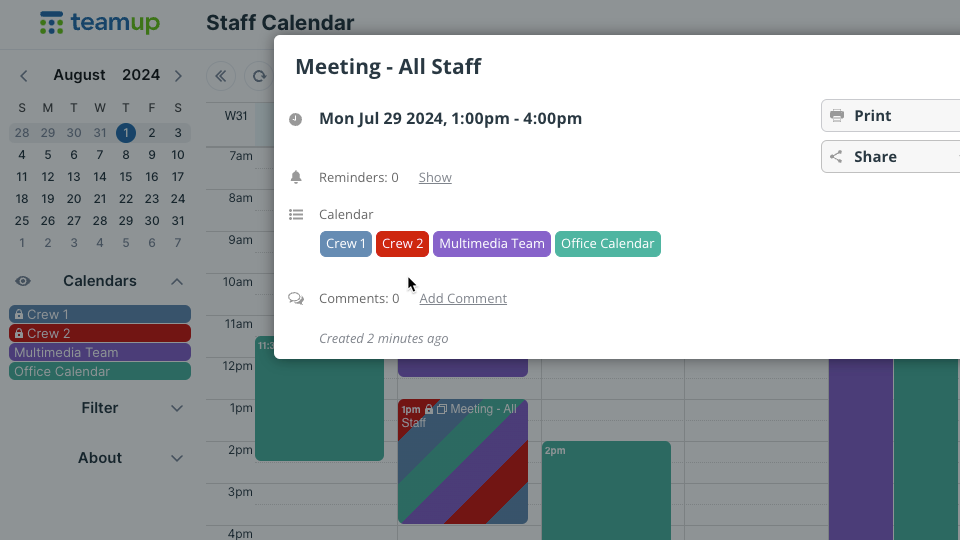
For Marco, this multi-calendar event will be locked; he can view it, but not edit it.
- Even though Marco has modify permission for the Office Calendar, he won't be able to modify that event because it's assigned to other sub-calendars with a lower access level.
- Because Marco has read-only permission for Crew 1 and Crew 2 calendars, the event is locked to read-only for Marco.
The event title will have a padlock icon, and when Marco opens the event he will see the event viewer rather than the event editor:
Related resources:
▶️ Review and Manage Who Can Access Each Sub-Calendar