
Teamup Ticker
Scroll through months in Multi-Week view
Multi-week view (browser only) is one of Teamup's 12 unique calendar views. It’s a good alternative to the standard monthly view as well as a great layout for long-term planning.
In Month view, it’s not possible to scroll between months: You need to use the arrows at the top to switch between months.
In Multi-week view, you can scroll through all the displayed weeks. Alternate shading shows you where one month ends and another begins.
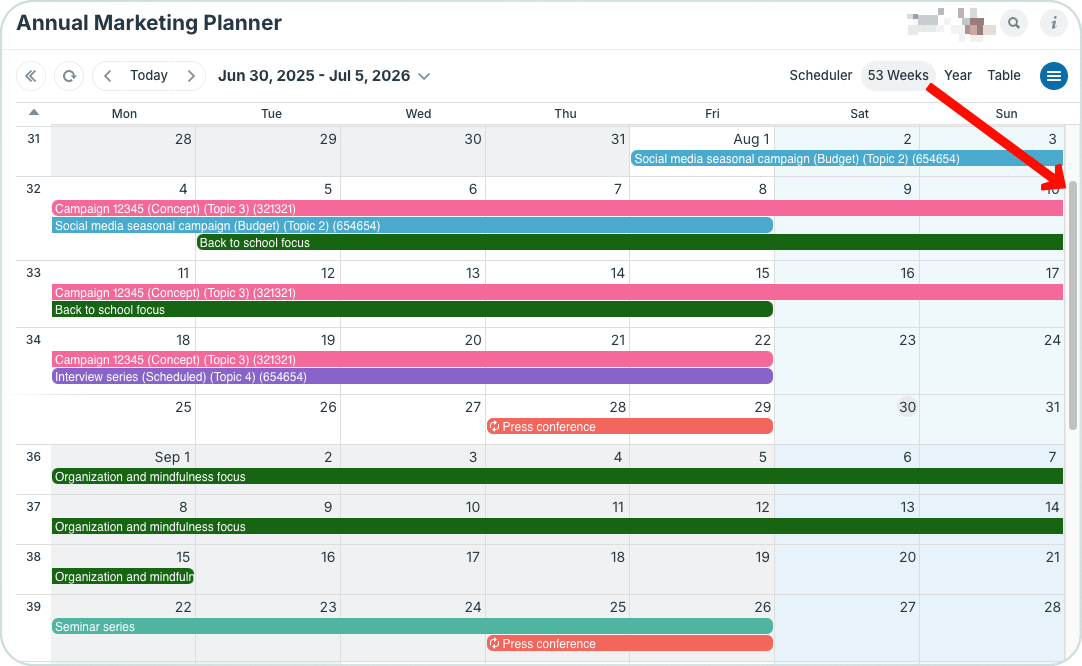
Set the visible weeks to 53 and use the scroll bar or mouse wheel to scroll over an entire year of events organized by week.
Multi-week view can show up to 53 weeks for a full year of calendar events. This allows you to view events across each week, organized in months, while scrolling and planning over an entire year.
🔗 More about Multi-Week view or more ways to see an entire calendar year on one page.