
Teamup Ticker
Three ways to "assign" an event to someone
If you're using Teamup to assign tasks, shifts, jobs, or meetings, there are several ways to set this up.
Assign each event to the appropriate sub-calendar(s)
Create a sub-calendar for each individual (or team). When you add an event to the calendar, select the sub-calendar for the individual you want to assign.
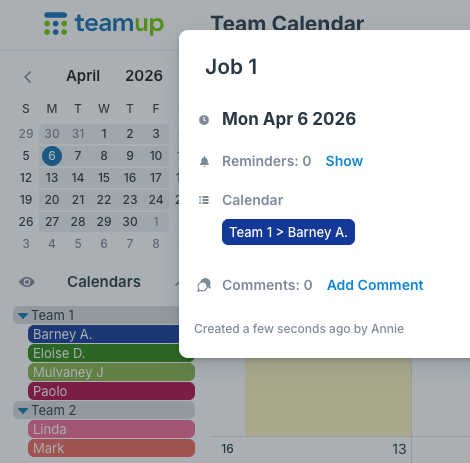
To assign multiple people to a single event, select multiple sub-calendars.
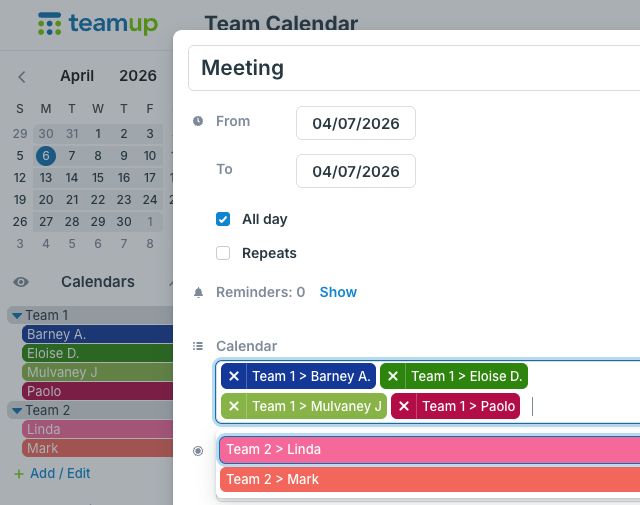
When to use this method:
- To automatically avoid double-booking people.
- To have a visual, color-coded way to see ownership instantly.
- If access control is important (e.g. only allowing users to see their own assigned tasks/jobs).
- To enable individuals to get a notification when a job is assigned.
Put the "owner's" name in the event title
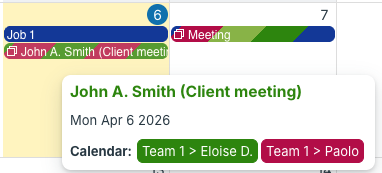
Simply type the name of the individual into the event title, or into another dedicated event field such as the Who field. You could make an event field required which will prevent any events from being saved unless the field has information in it.
When to use this method:
- To "assign" tasks to individuals who aren't internal team members (e.g. clients, subcontractors).
- If working with a large group of people, especially if there is high turnover (e.g. volunteers).
Select the individual from a custom choice field
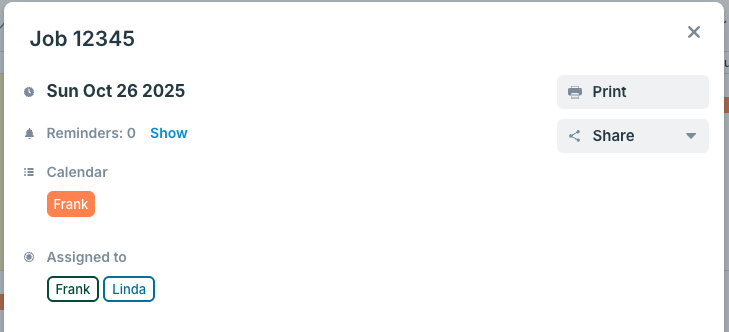
Create a choice field with predetermined options (names of individuals) that can be selected when an event is created. You can make the field single-choice (only one person can be selected at a time) or multiple choice. You can also make this field required so it cannot be skipped when creating or modifying an event.
When to use this method:
-
To show team members who they're working with (without having access to other team member calendars).
- To indicate participation from a small group of people (e.g. students, club members).