
Teamup Ticker
Share an entire series of repeating events
Mon Apr 13, 2026
.Ticker > Tips / Support Nuggets
Each event on a Teamup calendar can be shared easily via the Share menu, both in a browser and in the Teamup app.
When you share an event that is part of a recurring series, you share one event instance only (not the whole event series).
To share an entire recurring event series with someone who is not a user of your Teamup calendar, you could use an iCalendar feed:
- An iCalendar feed lets you set up a one-way sync between calendars. With an iCal feed, you can “feed” events from your Teamup calendar to a subscribing calendar automatically.
To set it up:
- To make sure they only see the recurring event series, create a new sub-calendar that will be the feed source. Assign the event series to both the original sub-calendar(s), and the newly created feed source sub-calendar.
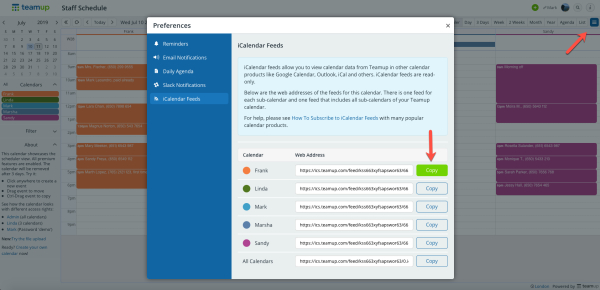
- Get the iCalendar feed link for the new "Feed source" sub-calendar only.
- Share that link with the person who needs to see the repeating events. They can then subscribe to the iCal feed in their own calendar.
In this example, the iCal feed for only the sub-calendar named 'Frank' has been copied:
icalendar, ical, feed, ics, share, sync, repeating events, recurring, event series