
Teamup Ticker
No Internet? Access your Teamup calendar offline using the mobile app
Mon Jun 15, 2026
.Ticker > Tips / Support Nuggets
On the Teamup mobile apps (available for iOS and Android) you can view your calendar(s) even when offline. Open the Teamup app as usual, and you can see all scheduled events and appointments on your calendar.
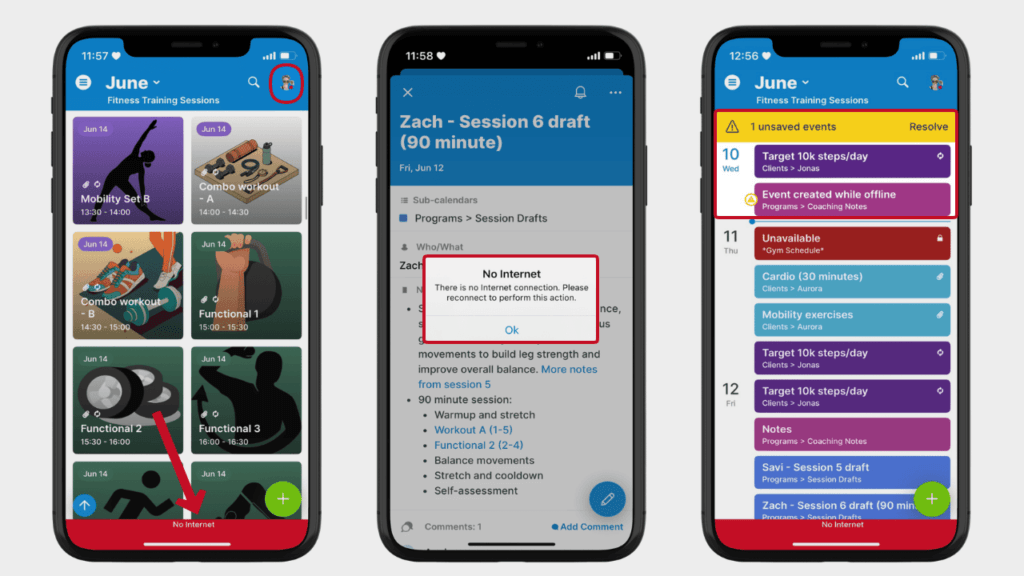
Here’s how it works:
- You can still tap any event to open it and see the event details that were synced before connectivity was lost. Updates made while you are offline will be synced once connection is restored.
- Offline status is indicated by a red dot in the top right (next to your user avatar) and a red No Internet banner at the bottom of the screen, as shown above (left screen). When connectivity is restored, a green banner will indicate that you’re back online.
- To prevent version conflict, you cannot edit events to your calendar when offline. If you attempt to edit an event, you’ll receive an error message as shown above (middle screen).
connect, internet, sync, app, mobile, connectivity, troubleshooting, access, offline