
Teamup Ticker
See events sorted in a timetable with columns
Mon 19 Jan 2026
.Ticker > Tips / Support Nuggets
If you're managing the team schedules or bookings for a sports club or similar organization, you may want to see the schedule in a certain way. Seeing the schedule as a timetable, with events sorted into distinct columns, allows you to view teams or booked items (like fields, boats, vehicles, etc.) in an organized, clear way.
Teamup has a special calendar view that's perfect: Scheduler view.
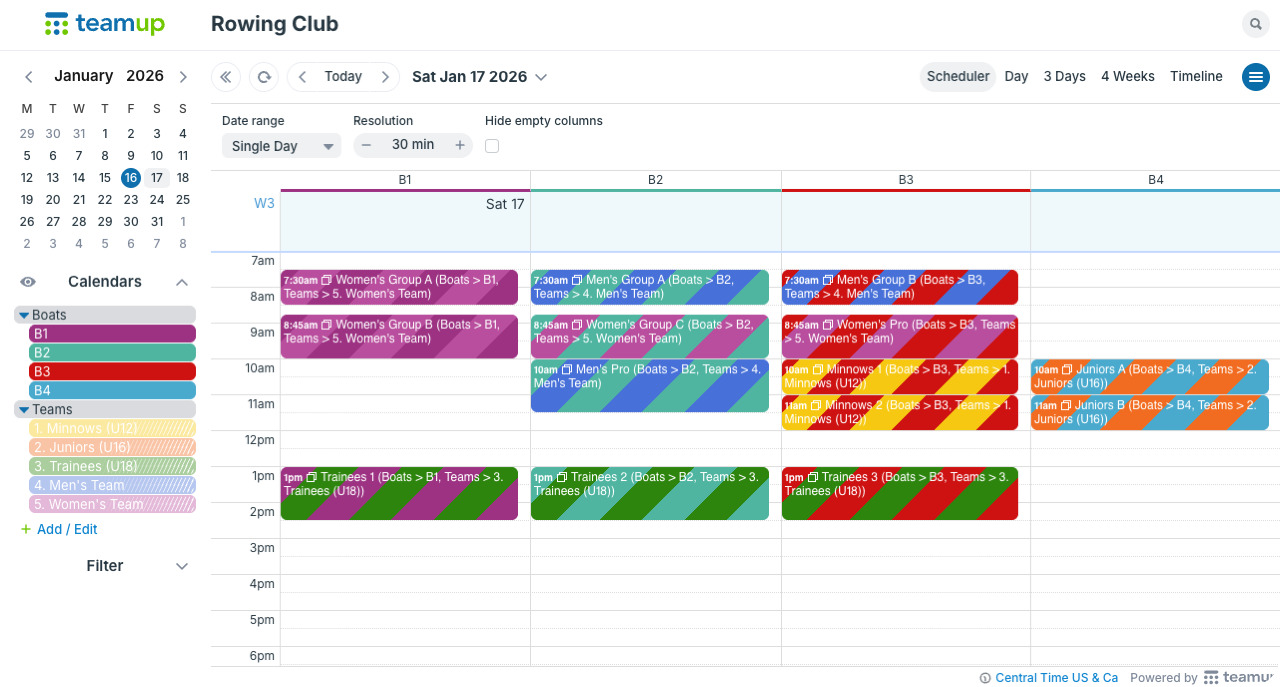
In Scheduler view, each sub-calendar is shown as a distinct column. All the events for a particular sub-calendar are stacked in its column. So you can view the whole schedule (for a single day or many weeks) at once, but still see each category of events distinctly.
Here's how:
- Create a sub-calendar for each category of events (e.g. teams, boats, fields). You can use folders to organize the calendars.
- For categories that cannot be double-booked, be sure to disallow overlapping events.
- When you add events to the calendar, add them to all the relevant sub-calendars. For example, if Team A is using Boat B at 7:30am on Monday, create an event for that time and date and assign it to both the Team A and Boat B sub-calendars.
- To view the events in distinct columns, go to Scheduler view. Toggle calendars on and off to view only certain calendars as columns. Adjust the date range and resolution as needed to view hours, a single day, multiple days, weeks, so on.
timetable, clubs, sports, booking, reservations, columns