
Teamup Ticker
🖥️ Canadian time zone options updated
Several Canadian provinces have recently changed their time zone rules.
To match these changes, we’ve updated our time zone options for these regions: British Columbia, Yukon, Northwest Territories and Manitoba.
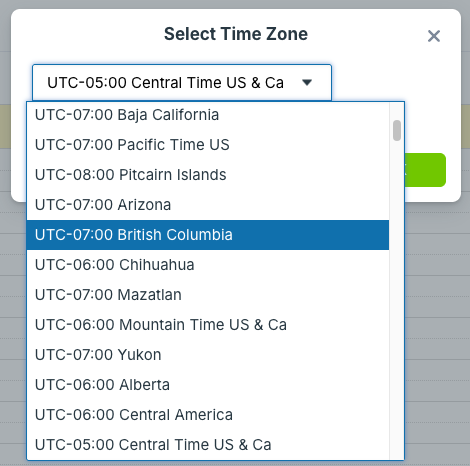
Note also that “Pacific Time” option is now called “Pacific Time US.”
We've added a new setting to keep all users on the same time zone. To ensure all users are using the calendar in the appropriate time zone, calendar administrators can prevent users from changing the time zone, which "locks" all users of a calendar to the calendar’s default time zone.
Change the time zone
▶️ Interactive Demo: Change the Time Zone
Administrators: Default time zone
Note that only the calendar administrator can update the default time zone through the calendar settings. If you do not have access to settings, contact the calendar administrator and ask them to update the default time zone. In the meantime, use the instructions below to change the displayed time zone manually for your current browser session.
- Open Teamup in a browser.
- Go to Settings > Date & Time.
- In the Time Zone section, click the menu to view time zones.
- Scroll or type in the search box to find the needed time zone in the list.
- Click on the time zone, or highlight and press enter, to set it as the default time zone for the calendar.
All users: Displayed time zone
Any user (at any permission level) can manually change the displayed time zone, and their choice will be remembered for the duration of their browser session. If the administrator has already updated the default time zone, you will not need to change the displayed time zone as well; it will automatically update to the default.
- Open Teamup in a browser.
- Click the time zone indicator in either location.
- A pop-up window will open with the time zone menu.
- Check the box below the menu to Show All Time Zones.
- Click the time zone you need from the list.
Currently these time zone options are only available on a browser. The Teamup app will be updated soon with the new time zone options as well.