
Teamup Ticker
🖥️ 📱 New setting: Keep all users on the same time zone
Several Canadian provinces recently changed their time zones. To help with changes like these and ensure all users are using the calendar in the appropriate time zone, calendar administrators can prevent users from changing the time zone, which "locks" all users of a calendar to the calendar’s default time zone.
When an admin updates the calendar’s time zone, every user’s browser and Teamup app change with it automatically.
Choose whether users can change their time zone
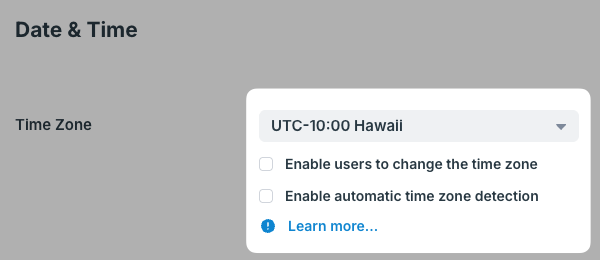
Calendar administrators:
- On a browser, log into Teamup and open the calendar.
- Go to Settings > Date & Time.
- In the Time Zone section at the top, the new checkbox Enable users to change the time zone is below the time zone menu.
- Checked: Users can select their own time zone, independent of the calendar's default setting.
- Unchecked: Users cannot change the time zone of the calendar. The time zone indicator in the footer is visible, showing the default time zone for the calendar, but it can’t be clicked or changed.
Why it matters: If an admin does not allow users to change the time zone, and then adjust the calendar’s time zone (for example, after the recent Canadian province changes), all users move with it right away.
- Use it only when all users of the calendar work in the same time zone or all event should only be viewed in the same time zone.
Automatic time zone detection
Admins can also choose whether to enable or disable automatic time zone detection, which is a separate control. Note, however, that if automatic time zone detection is enabled, this will automatically enable users to change the time zone as well.
Related info: